2017년 11월 14일 화요일

아파치 directory 접근제어 설정

아파치에 < Directory path>   </Directory> 지시어는 해당 Directory 내에 웹문서에 대해서 접근을 허용할것인지 거부할것인지에 대한 설정이 가능하다


Options: 파일과 디렉토리들에 대한 접근제어 설정
AllowOverride: 접근에 대해서 허용할것인지 거부할것인지에 대한 설정


ex)
 <Directory />
    Options FollowSymLinks
    AllowOverride All
    Require all denied
</Directory>


option에 대한 상세 정보는 httpd document를 참조
https://httpd.apache.org/docs/2.4/mod/core.html#options


AllowOverride 에 대한 상세 정보는 httpd document를 참조
https://httpd.apache.org/docs/2.4/mod/core.html#allowoverride


설정은 되도록 document로 확인하는게 제일 정확함


.htaccess파일 설정을 통해서 특정 사용자 또는 그룹만 접근이 가능하도록 설정하고
패스워드도 지정한다.


.htaccess 설정
AuthType Basic
AuthName "Password Required"
AuthUserFile /opt/web/httpd/password
Require user testuser


Password 설정
$APACHE_HOME/bin/htpasswd -c <경로> user
(./htpasswd -c /opt/web/httpd/password testuser)
위와 같이 하면 파일이 생기고 내용을 보면 암호화가 되어 있다
cat password
testuser:$apr1$BuzGGfmi$vc2phJaZWJqgG3LDux5gQ/


AllowOverride 테스트
AllowOverride All 설정

인증이 필요하다고 나온다. (.htaccess와 password에서 설정아 id/pw를 입력하면 페이지호출가능)


AllowOverride AuthConfig 설정
All 설정과 동일하게 인증이 필요하다고 나온다 .


AllowOverride None 설정
인증없이 바로 웹페이지 호출


만약 AllowOverride All 설정하고 .htaccess 파일이 없다면....어떤지 궁금하다
.htaccess 파일명을 변경해서 아파치 재기동
AllowOverride None 설정과 동일하다
AllowOverride All 은 .htaccess  파일에 의해서 접근제어가 되는듯 하다


2017년 8월 7일 월요일

아파치 구축

아파치 웹서버 (apache 2.4) 설치

1. 준비작업
wget 사용
wget http://ftp.gnu.org/gnu/libtool/libtool-2.4.6.tar.gz
wget http://mirror.jcubei.com/apache/apr-1.5.2.tar.gz
wget http://mirror.jcubei.com/apache/apr-util-1.5.4.tar.gz
wget http://www.atblog.co.kr/file/package/pcre-8.36.tar.gz
wget http://mirror.jcubei.com/apache/httpd-2.4.23.tar.gz
wget http://mirror.apache-kr.org/tomcat/tomcat-connectors/jk/tomcat-connectors-1.2.42-src.tar.gz
wget http://mirror.jcubei.com/apache/mod_cluster-1.3.1.Final.tar.gz


2. 컴파일
libtool library
./configure --prefix=/usr  <<설치 디렉토리
make
make install

apr library
./configure
make
make install

apr-util library
./configure --with-apr=/usr/local/apr/bin/apr-1-config
make
make install

pcre library
./configure --prefix=/usr/local/pcre
make
make install

httpd library
./configure \
--prefix=/usr/local/httpd \
--with-apr=/usr/local/apr/bin/apr-1-config \
--with-apr-util=/usr/local/apr/bin/apu-1-config \
--with-pcre=/usr/local/pcre \
--with-libxml2 \
--with-ssl \
--with-z \
--with-mpm=worker \
--enable-modules=most \
--enable-mods-shared=most \
--enable-cache \
--enable-file-cache \
--enable-so \
--enable-mime-magic \
--enable-expires \
--enable-header \
--enable-proxy \
--enable-ssl \
--enable-mpms-shared=all \
--enable-vhosts-alias --enable-rewrite
make
make install

tomcat connector library
cd tomcat-connectors-1.2.42-src/native
./configure --with-apxs=/usr/local/httpd/bin/apxs
make
make install

2017년 8월 2일 수요일

jsp 모델

jsp 모델에는 jsp 모델 1, jsp 모델 2가 있는데
우리가 흔히 쓰는 MVC 패턴이라고 하는것은 jsp 모델 2가르킨다.

<jsp 모델 1>

모델 1 구조는 클라이언트 요청이 HTML은 바로 처리 되지만 JSP같은 경우에는 DB에서 처리해야 하기 때문에 요청에 대해 JSP 빈즈를 이용해서 DB에 접속하고 처리해주는 방식이다.
위와 같은 방식은 그림에서 보는거와 같이 JSP 중복이 분명 있을 거고 중복이 있다는 것은 관리, 수정이 어렵다.


<jsp 모델 2=MVC>


모델 2 방식에서는 DAO(Data Access Object=모델)를 통해 데이터 처리만 담당하고 컨트롤러는 어디로 보내줘야 하는지 확인 하고 View는 단순 화면만 처리하게 되니 각 기능들을 분리 하기 때문에 M(Model)V(View)C(Controller) 이 모델 1 보다는 개발이 수월할 것으로 판단된다.

2017년 7월 3일 월요일

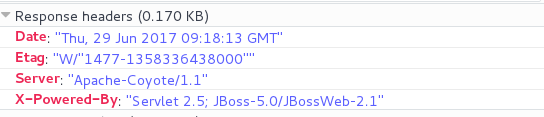
JBoss EAP 5 Header 정보 제거 방법

Jboss eap 5 설정에서 header 정보가 노출 되는 것이 default이다.
하지만 설정을 통해서 header 정보 노출 시키지 않을 수 있다.
설정방법은 아래와 같다
centos7
openjdk1.8
jboss eap 5.2
파이어폭스 브라우저
우선 응답헤더가 노출 되는지 F12를 통해서 확인


서버 정보를 없애는 설정은 두가지 입니다.
${JBOSS_HOME}/servers/${SERVER_NAME}/deploy/jbossweb.sar/server.xml 
Server 수정 (예: WAS)


${JBOSS_HOME}/servers/${SERVER_NAME}/deployers/jbossweb.deployer/web.xml 
X-Powered-By param-value 수정 및 삭제 (예: WAS)


이후 결과 화면 확인


위와 같이 설정 변경을 통해 응답헤더 정보를 없앨수 있다